Wednesday, January 6, 2016

What is a Heap Table in SQL?


Definition of a heap

 "an untidy collection of things piled up haphazardly"

So when we hear the word heap table at an interview, generally we say "A heap is a table without a clustered index. One or more nonclustered indexes can be created on tables stored as a heap. Data is stored in the heap without specifying an order."

To understand above statement, we have to fully understand concept on nonclustered index and how it work with a clustered index and without a clustered index against a table.

Some of you might ask then what is point of creating a nonclustered index on a table without a clustered index?

To understand this, let's go through what Microsoft says about Clustered and NonClustered index

  • Clustered
    • Clustered indexes sort and store the data rows in the table or view based on their key values. These are the columns included in the index definition. There can be only one clustered index per table, because the data rows themselves can be sorted in only one order.
    • The only time the data rows in a table are stored in sorted order is when the table contains a clustered index. When a table has a clustered index, the table is called a clustered table. If a table has no clustered index, its data rows are stored in an unordered structure called a heap.
  • Nonclustered
    • Nonclustered indexes have a structure separate from the data rows. A nonclustered index contains the nonclustered index key values and each key value entry has a pointer to the data row that contains the key value.
    • The pointer from an index row in a nonclustered index to a data row is called a row locator. The structure of the row locator depends on whether the data pages are stored in a heap or a clustered table. For a heap, a row locator is a pointer to the row. For a clustered table, the row locator is the clustered index key. 
Source: Microsoft MSDN link 

These are important point to remember from above reference


  • For a clustered table, the row locator is the clustered index key
  • The pointer from an index row in a nonclustered index to a data row is called a row locator
  • For a heap, a row locator is a pointer to the row

So the question is how many row will a query scan before finding the relevant record(s)? These index contains keys built from one or more columns in the table or view. These keys are stored in a structure (B-tree) that enables SQL Server to find the row or rows associated with the key values quickly and efficiently.

Coming back to heap table, we can define a table is a heap which does not have any order of data stored in it.


How to get first and last date of current year with day name

SELECT
StartOfYear = Convert(Varchar,DATEADD(yy, DATEDIFF(yy,0,getdate()), 0),101)
,CalendarFirstDayName = datename(dw,DATEADD(yy, DATEDIFF(yy,0,getdate()), 0))
,LastDayOfYear = Convert(Varchar,DATEADD(yy, DATEDIFF(yy,0,getdate()) + 1, -1),101)
,CalendarLastDayName = datename(DW,DATEADD(yy, DATEDIFF(yy,0,getdate()) + 1, -1))


Creating a Perfect Calendar table in SQL


 ;WITH CTE_DatesTable
AS
(
  SELECT CAST('20000101' as date) AS [date] --- Change this to your beginning time
  UNION ALL
  SELECT   DATEADD(dd, 1, [date])
  FROM CTE_DatesTable
  WHERE DATEADD(dd, 1, [date]) <= '20041231' --- Change this to your end time
)
Select
DateKey = substring(Cast([date] as varchar(10)),1,4) +substring(Cast([date] as varchar(10)),6,2)+substring(Cast([date] as varchar(10)),9,2)
,CalendarDate = [Date]
,[date] AS CalendarYearMonthDate
,CalendarYearYYYY = substring(Cast([date] as varchar(10)),1,4)
,CalendarYearMonthYYYYMM = substring(Cast([date] as varchar(10)),1,4) +substring(Cast([date] as varchar(10)),6,2)
,CalendarYearDDMMYYYY =substring(Cast([date] as varchar(10)),9,2)+'/'+substring(Cast([date] as varchar(10)),6,2)+'/'+substring(Cast([date] as varchar(10)),1,4)
,CalendarYearMMDDYYY =substring(Cast([date] as varchar(10)),6,2)+'/'+substring(Cast([date] as varchar(10)),9,2)+'/'+substring(Cast([date] as varchar(10)),1,4)
,CalendarDayCode = Upper(substring(datename(dw,[Date]),1,3))
,CalendarDayName = datename(dw,[Date])
,CalendarYearWeekCode =Datename(yy,[Date])+ RIGHT(DateName(wk,[Date]),2)
,CalendarYearWeekNumber = RIGHT(DateName(wk,[Date]),2)
,CalendarYearMonthName = Datename(MM, [date])
,CalendarYearMonthCode = substring(cast(Datename(MM, [date]) as Varchar(10)),1,3)
,CalendarMonthYearCode = substring(cast(Datename(MM, [date]) as Varchar(10)),1,3)+'-'+substring(Cast([date] as varchar(10)),3,2)
,[CalendarQuarter]='Q'+ Cast(DATENAME(quarter, [date]) AS Varchar(1))
,CalendarQuarterYearCode = 'Q'+ Cast(DATENAME(quarter, [date]) AS Varchar(1))+'-'+substring(Cast([date] as varchar(10)),3,2)
,CalendarYearQuarterCode = substring(Cast([date] as varchar(10)),1,4)+'Q'+ Cast(DATENAME(quarter, [date]) AS Varchar(1))
,CalendarYearIsLeapYear = CASE WHEN (cast(year([date]) as int) % 4 = 0 AND cast(year([date]) as int) % 100 <> 0) OR cast(year([date]) as int) % 400 = 0 THEN 'Y' ELSE 'N' END
,FiscalYear = cast(case when month([date]) > 10 then year([date]) else year([date])-1 end as varchar(4))--Depending when your fiscal year begin- in this it begin on 11/1/YYYY


from CTE_DatesTable
OPTION (MAXRECURSION 0);


Thursday, August 6, 2015

SQL Query: How to identify data with Beginning and Ending Character

Say that you have data like this in tour table and you are asked to find all the rows where last value in your result end in alph character such as ID 2, ID4 rows only.


Let's see how we can identify these rows using sql

Create sample data for this purpose.

CREATE table dbo.Test
( ID int IDENTITY,
 [Value] Varchar(10)
)
;
INSERT INTO dbo.TEST VALUES ('1000');
INSERT INTO dbo.TEST VALUES ('1000A');
INSERT INTO dbo.TEST VALUES ('B1000')
INSERT INTO dbo.TEST VALUES ('AAAAA')


SELECT * FROM dbo.Test

To identify rows which end in alpha character, use this query


Select * FROM dbo.Test
WHERE [Value] NOT LIKE  '%[0-9]'


Tuesday, August 4, 2015

SQL Server-- Row Logic Manipulation


In SQL sometime we are asked to compare data from two or more rows and manipulate data to meet certain business requirements.

Here I am going to show one common business requirement we see in different industries such as sales and marketing, healthcare, etc

Let's look at this transcational data in our sample table

Here you see that for ID 1, there are three rows, for ID 2, there are 3 rows and for ID 3, there is 1 rows.


Now say that your business requirement ask you that get the first Visit_Date and last Purchase_Date as one row. Whenever there is more than 3 day gap, treat them as new data set.

So your final result should look like this


Let's see how we can achieve this

--- Sample Data

-- Create following table to illustrate date tranformation

--Drop table dbo.sample_Data

Create Table dbo.sample_Data
( ID int
, Visit_Date Date
, Purchase_Date Date)

---INSERT sample Data

INSERT INTO dbo.sample_Data (ID, Visit_Date, Purchase_Date) VALUES (1, '2015-06-01','2015-06-02')
INSERT INTO dbo.sample_Data (ID, Visit_Date, Purchase_Date) VALUES (1, '2015-06-02','2015-06-03')
INSERT INTO dbo.sample_Data (ID, Visit_Date, Purchase_Date) VALUES (1, '2015-06-03','2015-06-04')
INSERT INTO dbo.sample_Data (ID, Visit_Date, Purchase_Date) VALUES (2, '2015-06-01','2015-06-02')
INSERT INTO dbo.sample_Data (ID, Visit_Date, Purchase_Date) VALUES (2, '2015-06-06','2015-06-07')
INSERT INTO dbo.sample_Data (ID, Visit_Date, Purchase_Date) VALUES (2, '2015-06-07','2015-06-08')
INSERT INTO dbo.sample_Data (ID, Visit_Date, Purchase_Date) VALUES (3, '2015-06-01','2015-06-02')

-- Check the data from table
SELECT * FROM dbo.sample_Data

- Now let's look data and what we are trying to do.

--Condition 1. In this case where ID = 1, we want one row of data with original Visit_Date and Last Purchase_Date here it is '2015-06-01' and 2015-06-04' as one row

-- Condition 2 if there are multiple different visit and purchase date, you want to get first visit_date and Last purchase_Date. If there is more then 3 day gap, you
--- want to have another row showing next visit_Date and Purchase_Date

-- ********************************
-- ==> STEP1: Create temp tables.
-- ********************************
-- Create the temp processing table.
-- Rows will be deleted from this table during merge process.


SELECT ROW_NUMBER () OVER (ORDER BY ID, Visit_Date) AS RowID, *
INTO #temp_Sample_Data
FROM dbo.sample_Data

-- Create table used for merging dates.
-- Initially, rows are associated with itself.

SELECT ID
, RowID AS RowID1
, Visit_Date As Visit_Date1
, Purchase_Date as Purchase_Date1
,RowID AS RowID2
, Visit_Date As Visit_Date2
, Purchase_Date as Purchase_Date2
INTO #tem_Sample_Date_Merge
 FROM #temp_Sample_Data

 -- *********************************************************
-- ==> STEP 2: Merge the records.
-- *********************************************************
DECLARE @MaxDayDifference INT =3
DECLARE @Continue INT = 1

BEGIN TRAN

WHILE (@Continue >0)

BEGIN

DELETE A
FROM #tem_Sample_Date_Merge AS A
INNER JOIN #tem_Sample_Date_Merge AS B
ON A.RowID2 = B.RowID2
AND A.RowID1 > B.RowID1

UPDATE A
SET RowID2 = B.RowID2
, Visit_Date2 = B.Visit_Date2
, Purchase_Date2 =B.Purchase_Date2
FROM #tem_Sample_Date_Merge AS A
INNER JOIN #tem_Sample_Date_Merge AS B
ON A.ID = B.ID
AND DATEDIFF(DAY, A.Purchase_Date2, B.Visit_Date1) <=@MaxDayDifference
AND B.RowID1 = (SELECT MIN(C.RowID1) FROM #tem_Sample_Date_Merge AS C
Where C.ID = B.ID
AND C.RowID1> A.RowID1)

SET @Continue = @@rowcount

END
COMMIT TRAN


SELECT A.ID
, A.Visit_Date
, C.Purchase_Date
FROM  #temp_Sample_Data As A
INNER JOIN #tem_Sample_Date_Merge AS B
ON A.RowID = B.RowID1
INNER JOIN #temp_Sample_Data AS C
ON B.RowID2 = C.RowID
ORDER BY A.ID, A.Visit_Date


Wednesday, March 25, 2015

Age calculation and Age function in SQL Server


AGE CALCULATION

1 Calculating Age as of End of the year

Sometime as business requirement dictate that we should calculate age at the time of end year ( this can be end of financial year, accounting year, measurement year, etc)

Let's say we have a table of employee with a field as Date_of_Birth or DOB.

DECLARE @AgeAsOf DATE = '2015-12-31

Select DOB, AGE = CASE WHEN dateadd(year, datediff (year, E.DOB, @AgeAsOf), E.DOB) > @AgeAsOf
THEN datediff (year, E.DOB, @AgeAsOf) - 1
ELSE datediff (year, E.DOB, @AgeAsOf)
END

FROM dbo.Employee


Say further that you have to select data based on certain age range and you have to passed this in your WHERE condition. Here we are looking for those employee who live in US
and are in age range between 35 and 50 only

DECLARE @AgeAsOf DATE = '2015-12-31

Select * FROM dbo.EMPLOYEE E
WHERE E.Employee_location = 'US'
AND (CASE WHEN dateadd(year, datediff (year, E.DOB, @AgeAsOf), E.DOB) > @AgeAsOf
THEN datediff (year, E.DOB, @AgeAsOf) - 1
ELSE datediff (year, E.DOB, @AgeAsOf)
END ) BETWEEN 35 AND 50

2. Calculating Age as of today (getdate())

You can use above query to get age as of today by replacing @AgeAsOf variable with getdate() function

Select DOB, AGE = AGE =CASE WHEN dateadd(year, datediff (year, E.DOB, getdate()), E.DOB) >getdate()
THEN datediff (year, E.DOB, getdate()) - 1
ELSE datediff (year, E.DOB, getdate())
END

FROM dbo.Employee


Select * FROM dbo.EMPLOYEE E
WHERE E.Employee_location = 'US'
AND (CASE WHEN dateadd(year, datediff (year, E.DOB, getdate()), E.DOB) > getdate()
THEN datediff (year, E.DOB, getdate() - 1
ELSE datediff (year, E.DOB, getdate())
END ) BETWEEN 35 AND 50


3. Creating a function to get AGE.
create function [dbo].[AgeAtGivenDate](
    @DOB    DATE,
    @PassedDate DATE
)

returns INT
with SCHEMABINDING
as
begin

DECLARE @iMonthDayDob INT
DECLARE @iMonthDayPassedDate INT


SELECT @iMonthDayDob = CAST(datepart (MM,@DOB) * 100 + datepart  (DD,@DOB) AS INT)
SELECT @iMonthDayPassedDate = CAST(datepart (MM,@PassedDate) * 100 + datepart  (DD,@PassedDate) AS INT)

RETURN DateDiff(YY,@DOB, @PassedDate)
- CASE WHEN @iMonthDayDob <= @iMonthDayPassedDate
  THEN 0
  ELSE 1
  END

END


--How to execute your function
DECLARE @ret INT;
EXEC @ret = [dbo].[AgeAtGivenDate] @DOB ='1923-08-28', @PassedDate = '2015-12-31'
PRINT @ret


Select  [dbo].[AgeAtGivenDate] ('1923-08-28',  '2015-12-31')

Select dbo.AgeAtGivenDate, DOB
FROM EMPLOYEE


Monday, March 16, 2015

SQL Table with Primary Key and Indexes

When we create a sql table with a primary key, we need to understand what happens behind the scene and how indexes are affected by it.

Let's go through a simple example and touch each topic as we go through it.

Let's create a table called country with following structure.

Create table dbo.Country 
(Country_ID int Identity (1,1) NOT NULL Primary Key
, Name Varchar(40)  NOT NULL
, Alpha_2_Code_Name Varchar(2)
, Alpha_3_Code_Name Varchar(3)
, Numeric_Code int NOT NULL
, ISO_3166_2_Code Varchar(20)
);

And insert following test data in this table just created.

Insert into dbo.Country (Name, Alpha_2_Code_Name, Alpha_3_Code_Name, Numeric_Code,ISO_3166_2_Code) VALUES  ('Afghanistan','AF','AFG',004,'ISO 3166-2:AF')
Insert into dbo.Country (Name, Alpha_2_Code_Name, Alpha_3_Code_Name, Numeric_Code,ISO_3166_2_Code) VALUES  ('Ă…land Islands','AX','ALA',248,'ISO 3166-2:AX')
Insert into dbo.Country (Name, Alpha_2_Code_Name, Alpha_3_Code_Name, Numeric_Code,ISO_3166_2_Code) VALUES  ('Albania','AL' ,'ALB',008,'ISO 3166-2:AL')
Insert into dbo.Country (Name, Alpha_2_Code_Name, Alpha_3_Code_Name, Numeric_Code,ISO_3166_2_Code) VALUES  ('Algeria','DZ' ,'DZA',012,'ISO 3166-2:DZ')
Insert into dbo.Country (Name, Alpha_2_Code_Name, Alpha_3_Code_Name, Numeric_Code,ISO_3166_2_Code) VALUES  ('American Samoa','AS','ASM',016 ,'ISO 3166-2:AS')
Insert into dbo.Country (Name, Alpha_2_Code_Name, Alpha_3_Code_Name, Numeric_Code,ISO_3166_2_Code) VALUES  ('Andorra','AD' ,'AND',020,'ISO 3166-2:AD')
Insert into dbo.Country (Name, Alpha_2_Code_Name, Alpha_3_Code_Name, Numeric_Code,ISO_3166_2_Code) VALUES  ('Angola','AO' ,'AGO',024,'ISO 3166-2:AO')
Insert into dbo.Country (Name, Alpha_2_Code_Name, Alpha_3_Code_Name, Numeric_Code,ISO_3166_2_Code) VALUES  ('Anguilla','AI' ,'AIA',660,'ISO 3166-2:AI')
Insert into dbo.Country (Name, Alpha_2_Code_Name, Alpha_3_Code_Name, Numeric_Code,ISO_3166_2_Code) VALUES  ('Antarctica','AQ','ATA',010,'ISO 3166-2:AQ')
Insert into dbo.Country (Name, Alpha_2_Code_Name, Alpha_3_Code_Name, Numeric_Code,ISO_3166_2_Code) VALUES  ('Antigua and Barbuda','AG' ,'ATG',028 ,'ISO 3166-2:AG')
Insert into dbo.Country (Name, Alpha_2_Code_Name, Alpha_3_Code_Name, Numeric_Code,ISO_3166_2_Code) VALUES  ('Argentina','AR','ARG',032,'ISO 3166-2:AR')

Now if we look at the table structure, this is how it looks like:


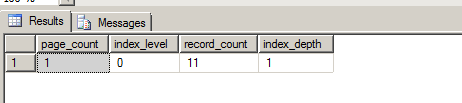
Now we look at index physical state by querying this function, we see following

SELECT page_count, index_level, record_count, index_depth
FROM sys.dm_db_index_physical_stats(db_id(N'Data_Base_Name'),object_id(N'dbo.country'),NULL, NULL, 'Detailed');


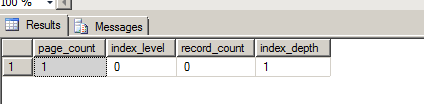
Let's see how this changes when we delete data from our table and how the index page reflects in that change.


1. DELETE FROM dbo.Country

Now re-run your above query

SELECT page_count, index_level, record_count, index_depth
FROM sys.dm_db_index_physical_stats(db_id(N'Data_Base_Name'),object_id(N'dbo.country'),NULL, NULL, 'Detailed');


So here basically we see that record count are deleted but page_count, and index_depth  remain same.

2. TRUNCATE table dbo.Country

After we truncate table, re-run your script.


SELECT page_count, index_level, record_count, index_depth
FROM sys.dm_db_index_physical_stats(db_id(N'Data_Base_Name'),object_id(N'dbo.country'),NULL, NULL, 'Detailed');


Here we see that everything has been truncated.

So when we truncate table, indexes is automatically dropped but structure definition remain same.