Error Message: Msg 8134, Level 16, State 1, Line 1480 Divide by zero error encountered.
What this error message tell us that we are trying to divide a numerator value by zero.
The best way to handle this kind of error in sql code is by using NULLIF or case statement.
USE NULLIF
Select Numerator/NULLIF(Denominator, 0) FROM table
In this above SQL statement, whenever Denominator is converted to 0 if there is missing value.
USE CASE Statement
Select CASE WHEN DENOMINATOR = 0 Then NULL ELSE Numerator/Denominator
FROM Table
Monday, May 1, 2017

Tuesday, March 29, 2016
checking gap in data with start and end date in SQL Server
--- Create table to hold data and show that logic works
Create Table #TempDateRange
(ID int
, Start_Date Date
, End_Date Date
)
Insert into #TempDateRange
(ID, Start_Date, End_Date)
SELECT 1, '2013-01-01', '2013-09-30'
UNION
SELECT 1, '2013-10-01', '2013-12-31'
UNION
SELECT 1, '2014-01-01', '2014-12-31'
UNION
SELECT 2,'2013-01-01', '2013-08-31'
UNION
SELECT 2,'2013-10-01', '2013-12-31'
UNION
SELECT 2, '2014-01-01', '2014-12-31'
----- Logic to club the Eligibility Record into one if there is a Continuous Enrollment for the Member
SELECT
s1.ID
, s1.Start_Date
, MIN(t1.End_Date) AS End_Date
INTO #Consolidated_Data
FROM #TempDateRange s1
INNER JOIN #TempDateRange t1
ON t1.ID = s1.ID
AND s1.Start_Date < = t1.End_Date
AND NOT EXISTS
(
SELECT *
FROM #TempDateRange t2
WHERE t2.ID = t1.ID
AND DATEADD(DAY, 1, t1.End_Date) > = t2.Start_Date
AND t1.End_Date < t2.End_Date
)
WHERE NOT EXISTS
(
SELECT *
FROM #TempDateRange s2
WHERE s2.ID = s1.ID
AND s1.Start_Date > s2.Start_Date
AND DATEADD(DAY, - 1, s1.Start_Date) < = s2.End_Date
)
GROUP BY s1.ID , s1.Start_Date
ORDER BY s1.ID , s1.Start_Date;
-- Ranking Based on Dates to Calculate GAP Calculation
SELECT
ID,
Start_Date,
End_Date,
RANK() OVER ( PARTITION BY ID ORDER BY Start_Date ASC, End_Date ASC ) RN,
RANK() OVER ( PARTITION BY ID ORDER BY Start_Date DESC, End_Date DESC ) RN_Inverse,
' ' AS GAP
INTO #Consolidated_Data_Rank
FROM #Consolidated_Data;
Select * FROM #Consolidated_Data
Select * FROM #Consolidated_Data_Rank
Create Table #TempDateRange
(ID int
, Start_Date Date
, End_Date Date
)
Insert into #TempDateRange
(ID, Start_Date, End_Date)
SELECT 1, '2013-01-01', '2013-09-30'
UNION
SELECT 1, '2013-10-01', '2013-12-31'
UNION
SELECT 1, '2014-01-01', '2014-12-31'
UNION
SELECT 2,'2013-01-01', '2013-08-31'
UNION
SELECT 2,'2013-10-01', '2013-12-31'
UNION
SELECT 2, '2014-01-01', '2014-12-31'
----- Logic to club the Eligibility Record into one if there is a Continuous Enrollment for the Member
SELECT
s1.ID
, s1.Start_Date
, MIN(t1.End_Date) AS End_Date
INTO #Consolidated_Data
FROM #TempDateRange s1
INNER JOIN #TempDateRange t1
ON t1.ID = s1.ID
AND s1.Start_Date < = t1.End_Date
AND NOT EXISTS
(
SELECT *
FROM #TempDateRange t2
WHERE t2.ID = t1.ID
AND DATEADD(DAY, 1, t1.End_Date) > = t2.Start_Date
AND t1.End_Date < t2.End_Date
)
WHERE NOT EXISTS
(
SELECT *
FROM #TempDateRange s2
WHERE s2.ID = s1.ID
AND s1.Start_Date > s2.Start_Date
AND DATEADD(DAY, - 1, s1.Start_Date) < = s2.End_Date
)
GROUP BY s1.ID , s1.Start_Date
ORDER BY s1.ID , s1.Start_Date;
-- Ranking Based on Dates to Calculate GAP Calculation
SELECT
ID,
Start_Date,
End_Date,
RANK() OVER ( PARTITION BY ID ORDER BY Start_Date ASC, End_Date ASC ) RN,
RANK() OVER ( PARTITION BY ID ORDER BY Start_Date DESC, End_Date DESC ) RN_Inverse,
' ' AS GAP
INTO #Consolidated_Data_Rank
FROM #Consolidated_Data;
Select * FROM #Consolidated_Data
Select * FROM #Consolidated_Data_Rank
Wednesday, February 24, 2016
sql calculate total number of day in a given year
To get accurate number of days in a given year, we have to check if the given year is a leap year or not. To see if it is a leap year, the year part of date (for example 2016 of 02/24/2016) should be divisible by 4 and there should be no remainder.
So let's see how we do this is SQL (2008 and above version)
First we need to declare a variable (BIT Type) and default it to 0.
Declare @IsLeapYear BIT = 0;
Then declare date variable for which you need to calculate. In my case I am using getdate() to set to current year and we know it is leap year
Declare @MyYear Date = Getdate();
Now we add logic to check if it leap year or not
IF (YEAR( @MyYear ) % 4 = 0 AND YEAR( @MyYear ) % 100 != 0) OR
YEAR( @MyYear ) % 400 = 0
SET @IsLeapYear = 1
This way we know if it is leapyear, it will set @IsLeapYear to 1 and if not it will be 0
Select 365 + @IsLeapYear
This select statement will tell me number of days in a given year.
So you whole SQL statement should be something like this.
DECLARE @IsLeapYear BIT = 0 , @MyYear DATE = getdate()
IF (YEAR( @MyYear ) % 4 = 0 AND YEAR( @MyYear ) % 100 != 0) OR
YEAR( @MyYear ) % 400 = 0
SET @IsLeapYear = 1
Select 365 + @IsLeapYear
2012 and above version
DECLARE @year AS INT
SET @year=2013
Select DATEPART(dy,DATEFROMPARTS(@Year,12,31))
AS [NumberofDaysInYear]
So let's see how we do this is SQL (2008 and above version)
First we need to declare a variable (BIT Type) and default it to 0.
Declare @IsLeapYear BIT = 0;
Then declare date variable for which you need to calculate. In my case I am using getdate() to set to current year and we know it is leap year
Declare @MyYear Date = Getdate();
Now we add logic to check if it leap year or not
IF (YEAR( @MyYear ) % 4 = 0 AND YEAR( @MyYear ) % 100 != 0) OR
YEAR( @MyYear ) % 400 = 0
SET @IsLeapYear = 1
This way we know if it is leapyear, it will set @IsLeapYear to 1 and if not it will be 0
Select 365 + @IsLeapYear
This select statement will tell me number of days in a given year.
So you whole SQL statement should be something like this.
DECLARE @IsLeapYear BIT = 0 , @MyYear DATE = getdate()
IF (YEAR( @MyYear ) % 4 = 0 AND YEAR( @MyYear ) % 100 != 0) OR
YEAR( @MyYear ) % 400 = 0
SET @IsLeapYear = 1
Select 365 + @IsLeapYear
2012 and above version
DECLARE @year AS INT
SET @year=2013
Select DATEPART(dy,DATEFROMPARTS(@Year,12,31))
AS [NumberofDaysInYear]
Wednesday, January 6, 2016
What is a Heap Table in SQL?
Definition of a heap
"an untidy collection of things piled up haphazardly"
So when we hear the word heap table at an interview, generally we say "A heap is a table without a clustered index. One or more nonclustered indexes can be created on tables stored as a heap. Data is stored in the heap without specifying an order."
To understand above statement, we have to fully understand concept on nonclustered index and how it work with a clustered index and without a clustered index against a table.
Some of you might ask then what is point of creating a nonclustered index on a table without a clustered index?
To understand this, let's go through what Microsoft says about Clustered and NonClustered index
- Clustered
- Clustered indexes sort and store the data rows in the table or view based on their key values. These are the columns included in the index definition. There can be only one clustered index per table, because the data rows themselves can be sorted in only one order.
- The only time the data rows in a table are stored in sorted order is when the table contains a clustered index. When a table has a clustered index, the table is called a clustered table. If a table has no clustered index, its data rows are stored in an unordered structure called a heap.
- Nonclustered
- Nonclustered indexes have a structure separate from the data rows. A nonclustered index contains the nonclustered index key values and each key value entry has a pointer to the data row that contains the key value.
- The pointer from an index row in a nonclustered index to a data row is called a row locator. The structure of the row locator depends on whether the data pages are stored in a heap or a clustered table. For a heap, a row locator is a pointer to the row. For a clustered table, the row locator is the clustered index key.
These are important point to remember from above reference
- For a clustered table, the row locator is the clustered index key
- The pointer from an index row in a nonclustered index to a data row is called a row locator
- For a heap, a row locator is a pointer to the row
So the question is how many row will a query scan before finding the relevant record(s)? These index contains keys built from one or more columns in the table or view. These keys are stored in a structure (B-tree) that enables SQL Server to find the row or rows associated with the key values quickly and efficiently.
Coming back to heap table, we can define a table is a heap which does not have any order of data stored in it.
How to get first and last date of current year with day name
SELECT
StartOfYear = Convert(Varchar,DATEADD(yy, DATEDIFF(yy,0,getdate()), 0),101)
,CalendarFirstDayName = datename(dw,DATEADD(yy, DATEDIFF(yy,0,getdate()), 0))
,LastDayOfYear = Convert(Varchar,DATEADD(yy, DATEDIFF(yy,0,getdate()) + 1, -1),101)
,CalendarLastDayName = datename(DW,DATEADD(yy, DATEDIFF(yy,0,getdate()) + 1, -1))

StartOfYear = Convert(Varchar,DATEADD(yy, DATEDIFF(yy,0,getdate()), 0),101)
,CalendarFirstDayName = datename(dw,DATEADD(yy, DATEDIFF(yy,0,getdate()), 0))
,LastDayOfYear = Convert(Varchar,DATEADD(yy, DATEDIFF(yy,0,getdate()) + 1, -1),101)
,CalendarLastDayName = datename(DW,DATEADD(yy, DATEDIFF(yy,0,getdate()) + 1, -1))

Creating a Perfect Calendar table in SQL
;WITH CTE_DatesTable
AS
(
SELECT CAST('20000101' as date) AS [date] --- Change this to your beginning time
UNION ALL
SELECT DATEADD(dd, 1, [date])
FROM CTE_DatesTable
WHERE DATEADD(dd, 1, [date]) <= '20041231' --- Change this to your end time
)
Select
DateKey = substring(Cast([date] as varchar(10)),1,4) +substring(Cast([date] as varchar(10)),6,2)+substring(Cast([date] as varchar(10)),9,2)
,CalendarDate = [Date]
,[date] AS CalendarYearMonthDate
,CalendarYearYYYY = substring(Cast([date] as varchar(10)),1,4)
,CalendarYearMonthYYYYMM = substring(Cast([date] as varchar(10)),1,4) +substring(Cast([date] as varchar(10)),6,2)
,CalendarYearDDMMYYYY =substring(Cast([date] as varchar(10)),9,2)+'/'+substring(Cast([date] as varchar(10)),6,2)+'/'+substring(Cast([date] as varchar(10)),1,4)
,CalendarYearMMDDYYY =substring(Cast([date] as varchar(10)),6,2)+'/'+substring(Cast([date] as varchar(10)),9,2)+'/'+substring(Cast([date] as varchar(10)),1,4)
,CalendarDayCode = Upper(substring(datename(dw,[Date]),1,3))
,CalendarDayName = datename(dw,[Date])
,CalendarYearWeekCode =Datename(yy,[Date])+ RIGHT(DateName(wk,[Date]),2)
,CalendarYearWeekNumber = RIGHT(DateName(wk,[Date]),2)
,CalendarYearMonthName = Datename(MM, [date])
,CalendarYearMonthCode = substring(cast(Datename(MM, [date]) as Varchar(10)),1,3)
,CalendarMonthYearCode = substring(cast(Datename(MM, [date]) as Varchar(10)),1,3)+'-'+substring(Cast([date] as varchar(10)),3,2)
,[CalendarQuarter]='Q'+ Cast(DATENAME(quarter, [date]) AS Varchar(1))
,CalendarQuarterYearCode = 'Q'+ Cast(DATENAME(quarter, [date]) AS Varchar(1))+'-'+substring(Cast([date] as varchar(10)),3,2)
,CalendarYearQuarterCode = substring(Cast([date] as varchar(10)),1,4)+'Q'+ Cast(DATENAME(quarter, [date]) AS Varchar(1))
,CalendarYearIsLeapYear = CASE WHEN (cast(year([date]) as int) % 4 = 0 AND cast(year([date]) as int) % 100 <> 0) OR cast(year([date]) as int) % 400 = 0 THEN 'Y' ELSE 'N' END
,FiscalYear = cast(case when month([date]) > 10 then year([date]) else year([date])-1 end as varchar(4))--Depending when your fiscal year begin- in this it begin on 11/1/YYYY
from CTE_DatesTable
OPTION (MAXRECURSION 0);

Thursday, August 6, 2015
SQL Query: How to identify data with Beginning and Ending Character
Say that you have data like this in tour table and you are asked to find all the rows where last value in your result end in alph character such as ID 2, ID4 rows only.

Let's see how we can identify these rows using sql
Create sample data for this purpose.
CREATE table dbo.Test
( ID int IDENTITY,
[Value] Varchar(10)
)
;
INSERT INTO dbo.TEST VALUES ('1000');
INSERT INTO dbo.TEST VALUES ('1000A');
INSERT INTO dbo.TEST VALUES ('B1000')
INSERT INTO dbo.TEST VALUES ('AAAAA')
SELECT * FROM dbo.Test
To identify rows which end in alpha character, use this query
Select * FROM dbo.Test
WHERE [Value] NOT LIKE '%[0-9]'


Let's see how we can identify these rows using sql
Create sample data for this purpose.
CREATE table dbo.Test
( ID int IDENTITY,
[Value] Varchar(10)
)
;
INSERT INTO dbo.TEST VALUES ('1000');
INSERT INTO dbo.TEST VALUES ('1000A');
INSERT INTO dbo.TEST VALUES ('B1000')
INSERT INTO dbo.TEST VALUES ('AAAAA')
SELECT * FROM dbo.Test
To identify rows which end in alpha character, use this query
Select * FROM dbo.Test
WHERE [Value] NOT LIKE '%[0-9]'

Tuesday, August 4, 2015
SQL Server-- Row Logic Manipulation
In SQL sometime we are asked to compare data from two or more rows and manipulate data to meet certain business requirements.
Here I am going to show one common business requirement we see in different industries such as sales and marketing, healthcare, etc
Let's look at this transcational data in our sample table
Here you see that for ID 1, there are three rows, for ID 2, there are 3 rows and for ID 3, there is 1 rows.

Now say that your business requirement ask you that get the first Visit_Date and last Purchase_Date as one row. Whenever there is more than 3 day gap, treat them as new data set.
So your final result should look like this

Let's see how we can achieve this
--- Sample Data
-- Create following table to illustrate date tranformation
--Drop table dbo.sample_Data
Create Table dbo.sample_Data
( ID int
, Visit_Date Date
, Purchase_Date Date)
---INSERT sample Data
INSERT INTO dbo.sample_Data (ID, Visit_Date, Purchase_Date) VALUES (1, '2015-06-01','2015-06-02')
INSERT INTO dbo.sample_Data (ID, Visit_Date, Purchase_Date) VALUES (1, '2015-06-02','2015-06-03')
INSERT INTO dbo.sample_Data (ID, Visit_Date, Purchase_Date) VALUES (1, '2015-06-03','2015-06-04')
INSERT INTO dbo.sample_Data (ID, Visit_Date, Purchase_Date) VALUES (2, '2015-06-01','2015-06-02')
INSERT INTO dbo.sample_Data (ID, Visit_Date, Purchase_Date) VALUES (2, '2015-06-06','2015-06-07')
INSERT INTO dbo.sample_Data (ID, Visit_Date, Purchase_Date) VALUES (2, '2015-06-07','2015-06-08')
INSERT INTO dbo.sample_Data (ID, Visit_Date, Purchase_Date) VALUES (3, '2015-06-01','2015-06-02')
-- Check the data from table
SELECT * FROM dbo.sample_Data
- Now let's look data and what we are trying to do.
--Condition 1. In this case where ID = 1, we want one row of data with original Visit_Date and Last Purchase_Date here it is '2015-06-01' and 2015-06-04' as one row
-- Condition 2 if there are multiple different visit and purchase date, you want to get first visit_date and Last purchase_Date. If there is more then 3 day gap, you
--- want to have another row showing next visit_Date and Purchase_Date
-- ********************************
-- ==> STEP1: Create temp tables.
-- ********************************
-- Create the temp processing table.
-- Rows will be deleted from this table during merge process.
SELECT ROW_NUMBER () OVER (ORDER BY ID, Visit_Date) AS RowID, *
INTO #temp_Sample_Data
FROM dbo.sample_Data
-- Create table used for merging dates.
-- Initially, rows are associated with itself.
SELECT ID
, RowID AS RowID1
, Visit_Date As Visit_Date1
, Purchase_Date as Purchase_Date1
,RowID AS RowID2
, Visit_Date As Visit_Date2
, Purchase_Date as Purchase_Date2
INTO #tem_Sample_Date_Merge
FROM #temp_Sample_Data
-- *********************************************************
-- ==> STEP 2: Merge the records.
-- *********************************************************
DECLARE @MaxDayDifference INT =3
DECLARE @Continue INT = 1
BEGIN TRAN
WHILE (@Continue >0)
BEGIN
DELETE A
FROM #tem_Sample_Date_Merge AS A
INNER JOIN #tem_Sample_Date_Merge AS B
ON A.RowID2 = B.RowID2
AND A.RowID1 > B.RowID1
UPDATE A
SET RowID2 = B.RowID2
, Visit_Date2 = B.Visit_Date2
, Purchase_Date2 =B.Purchase_Date2
FROM #tem_Sample_Date_Merge AS A
INNER JOIN #tem_Sample_Date_Merge AS B
ON A.ID = B.ID
AND DATEDIFF(DAY, A.Purchase_Date2, B.Visit_Date1) <=@MaxDayDifference
AND B.RowID1 = (SELECT MIN(C.RowID1) FROM #tem_Sample_Date_Merge AS C
Where C.ID = B.ID
AND C.RowID1> A.RowID1)
SET @Continue = @@rowcount
END
COMMIT TRAN
SELECT A.ID
, A.Visit_Date
, C.Purchase_Date
FROM #temp_Sample_Data As A
INNER JOIN #tem_Sample_Date_Merge AS B
ON A.RowID = B.RowID1
INNER JOIN #temp_Sample_Data AS C
ON B.RowID2 = C.RowID
ORDER BY A.ID, A.Visit_Date
Wednesday, March 25, 2015
Age calculation and Age function in SQL Server
AGE CALCULATION
1 Calculating Age as of End of the year
Sometime as business requirement dictate that we should calculate age at the time of end year ( this can be end of financial year, accounting year, measurement year, etc)
Let's say we have a table of employee with a field as Date_of_Birth or DOB.
DECLARE @AgeAsOf DATE = '2015-12-31
Select DOB, AGE = CASE WHEN dateadd(year, datediff (year, E.DOB, @AgeAsOf), E.DOB) > @AgeAsOf
THEN datediff (year, E.DOB, @AgeAsOf) - 1
ELSE datediff (year, E.DOB, @AgeAsOf)
END
FROM dbo.Employee
Say further that you have to select data based on certain age range and you have to passed this in your WHERE condition. Here we are looking for those employee who live in US
and are in age range between 35 and 50 only
DECLARE @AgeAsOf DATE = '2015-12-31
Select * FROM dbo.EMPLOYEE E
WHERE E.Employee_location = 'US'
AND (CASE WHEN dateadd(year, datediff (year, E.DOB, @AgeAsOf), E.DOB) > @AgeAsOf
THEN datediff (year, E.DOB, @AgeAsOf) - 1
ELSE datediff (year, E.DOB, @AgeAsOf)
END ) BETWEEN 35 AND 50
2. Calculating Age as of today (getdate())
You can use above query to get age as of today by replacing @AgeAsOf variable with getdate() function
Select DOB, AGE = AGE =CASE WHEN dateadd(year, datediff (year, E.DOB, getdate()), E.DOB) >getdate()
THEN datediff (year, E.DOB, getdate()) - 1
ELSE datediff (year, E.DOB, getdate())
END
FROM dbo.Employee
Select * FROM dbo.EMPLOYEE E
WHERE E.Employee_location = 'US'
AND (CASE WHEN dateadd(year, datediff (year, E.DOB, getdate()), E.DOB) > getdate()
THEN datediff (year, E.DOB, getdate() - 1
ELSE datediff (year, E.DOB, getdate())
END ) BETWEEN 35 AND 50
3. Creating a function to get AGE.
create function [dbo].[AgeAtGivenDate](
@DOB DATE,
@PassedDate DATE
)
returns INT
with SCHEMABINDING
as
begin
DECLARE @iMonthDayDob INT
DECLARE @iMonthDayPassedDate INT
SELECT @iMonthDayDob = CAST(datepart (MM,@DOB) * 100 + datepart (DD,@DOB) AS INT)
SELECT @iMonthDayPassedDate = CAST(datepart (MM,@PassedDate) * 100 + datepart (DD,@PassedDate) AS INT)
RETURN DateDiff(YY,@DOB, @PassedDate)
- CASE WHEN @iMonthDayDob <= @iMonthDayPassedDate
THEN 0
ELSE 1
END
END
--How to execute your function
DECLARE @ret INT;
EXEC @ret = [dbo].[AgeAtGivenDate] @DOB ='1923-08-28', @PassedDate = '2015-12-31'
PRINT @ret
Select [dbo].[AgeAtGivenDate] ('1923-08-28', '2015-12-31')
Select dbo.AgeAtGivenDate, DOB
FROM EMPLOYEE
Monday, March 16, 2015
SQL Table with Primary Key and Indexes
When we create a sql table with a primary key, we need to understand what happens behind the scene and how indexes are affected by it.
Let's go through a simple example and touch each topic as we go through it.
Let's create a table called country with following structure.
Create table dbo.Country
(Country_ID int Identity (1,1) NOT NULL Primary Key
, Name Varchar(40) NOT NULL
, Alpha_2_Code_Name Varchar(2)
, Alpha_3_Code_Name Varchar(3)
, Numeric_Code int NOT NULL
, ISO_3166_2_Code Varchar(20)
);
And insert following test data in this table just created.
Insert into dbo.Country (Name, Alpha_2_Code_Name, Alpha_3_Code_Name, Numeric_Code,ISO_3166_2_Code) VALUES ('Afghanistan','AF','AFG',004,'ISO 3166-2:AF')
Insert into dbo.Country (Name, Alpha_2_Code_Name, Alpha_3_Code_Name, Numeric_Code,ISO_3166_2_Code) VALUES ('Åland Islands','AX','ALA',248,'ISO 3166-2:AX')
Insert into dbo.Country (Name, Alpha_2_Code_Name, Alpha_3_Code_Name, Numeric_Code,ISO_3166_2_Code) VALUES ('Albania','AL' ,'ALB',008,'ISO 3166-2:AL')
Insert into dbo.Country (Name, Alpha_2_Code_Name, Alpha_3_Code_Name, Numeric_Code,ISO_3166_2_Code) VALUES ('Algeria','DZ' ,'DZA',012,'ISO 3166-2:DZ')
Insert into dbo.Country (Name, Alpha_2_Code_Name, Alpha_3_Code_Name, Numeric_Code,ISO_3166_2_Code) VALUES ('American Samoa','AS','ASM',016 ,'ISO 3166-2:AS')
Insert into dbo.Country (Name, Alpha_2_Code_Name, Alpha_3_Code_Name, Numeric_Code,ISO_3166_2_Code) VALUES ('Andorra','AD' ,'AND',020,'ISO 3166-2:AD')
Insert into dbo.Country (Name, Alpha_2_Code_Name, Alpha_3_Code_Name, Numeric_Code,ISO_3166_2_Code) VALUES ('Angola','AO' ,'AGO',024,'ISO 3166-2:AO')
Insert into dbo.Country (Name, Alpha_2_Code_Name, Alpha_3_Code_Name, Numeric_Code,ISO_3166_2_Code) VALUES ('Anguilla','AI' ,'AIA',660,'ISO 3166-2:AI')
Insert into dbo.Country (Name, Alpha_2_Code_Name, Alpha_3_Code_Name, Numeric_Code,ISO_3166_2_Code) VALUES ('Antarctica','AQ','ATA',010,'ISO 3166-2:AQ')
Insert into dbo.Country (Name, Alpha_2_Code_Name, Alpha_3_Code_Name, Numeric_Code,ISO_3166_2_Code) VALUES ('Antigua and Barbuda','AG' ,'ATG',028 ,'ISO 3166-2:AG')
Insert into dbo.Country (Name, Alpha_2_Code_Name, Alpha_3_Code_Name, Numeric_Code,ISO_3166_2_Code) VALUES ('Argentina','AR','ARG',032,'ISO 3166-2:AR')
Now if we look at the table structure, this is how it looks like:

Now we look at index physical state by querying this function, we see following
SELECT page_count, index_level, record_count, index_depth
FROM sys.dm_db_index_physical_stats(db_id(N'Data_Base_Name'),object_id(N'dbo.country'),NULL, NULL, 'Detailed');
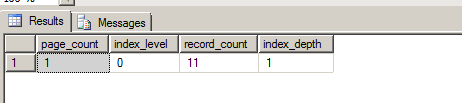
Let's see how this changes when we delete data from our table and how the index page reflects in that change.
1. DELETE FROM dbo.Country
Now re-run your above query
SELECT page_count, index_level, record_count, index_depth
FROM sys.dm_db_index_physical_stats(db_id(N'Data_Base_Name'),object_id(N'dbo.country'),NULL, NULL, 'Detailed');
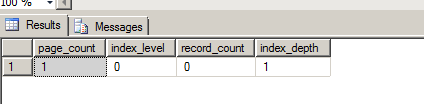
So here basically we see that record count are deleted but page_count, and index_depth remain same.
2. TRUNCATE table dbo.Country
After we truncate table, re-run your script.
SELECT page_count, index_level, record_count, index_depth
FROM sys.dm_db_index_physical_stats(db_id(N'Data_Base_Name'),object_id(N'dbo.country'),NULL, NULL, 'Detailed');

Here we see that everything has been truncated.
So when we truncate table, indexes is automatically dropped but structure definition remain same.
Let's go through a simple example and touch each topic as we go through it.
Let's create a table called country with following structure.
Create table dbo.Country
(Country_ID int Identity (1,1) NOT NULL Primary Key
, Name Varchar(40) NOT NULL
, Alpha_2_Code_Name Varchar(2)
, Alpha_3_Code_Name Varchar(3)
, Numeric_Code int NOT NULL
, ISO_3166_2_Code Varchar(20)
);
And insert following test data in this table just created.
Insert into dbo.Country (Name, Alpha_2_Code_Name, Alpha_3_Code_Name, Numeric_Code,ISO_3166_2_Code) VALUES ('Afghanistan','AF','AFG',004,'ISO 3166-2:AF')
Insert into dbo.Country (Name, Alpha_2_Code_Name, Alpha_3_Code_Name, Numeric_Code,ISO_3166_2_Code) VALUES ('Åland Islands','AX','ALA',248,'ISO 3166-2:AX')
Insert into dbo.Country (Name, Alpha_2_Code_Name, Alpha_3_Code_Name, Numeric_Code,ISO_3166_2_Code) VALUES ('Albania','AL' ,'ALB',008,'ISO 3166-2:AL')
Insert into dbo.Country (Name, Alpha_2_Code_Name, Alpha_3_Code_Name, Numeric_Code,ISO_3166_2_Code) VALUES ('Algeria','DZ' ,'DZA',012,'ISO 3166-2:DZ')
Insert into dbo.Country (Name, Alpha_2_Code_Name, Alpha_3_Code_Name, Numeric_Code,ISO_3166_2_Code) VALUES ('American Samoa','AS','ASM',016 ,'ISO 3166-2:AS')
Insert into dbo.Country (Name, Alpha_2_Code_Name, Alpha_3_Code_Name, Numeric_Code,ISO_3166_2_Code) VALUES ('Andorra','AD' ,'AND',020,'ISO 3166-2:AD')
Insert into dbo.Country (Name, Alpha_2_Code_Name, Alpha_3_Code_Name, Numeric_Code,ISO_3166_2_Code) VALUES ('Angola','AO' ,'AGO',024,'ISO 3166-2:AO')
Insert into dbo.Country (Name, Alpha_2_Code_Name, Alpha_3_Code_Name, Numeric_Code,ISO_3166_2_Code) VALUES ('Anguilla','AI' ,'AIA',660,'ISO 3166-2:AI')
Insert into dbo.Country (Name, Alpha_2_Code_Name, Alpha_3_Code_Name, Numeric_Code,ISO_3166_2_Code) VALUES ('Antarctica','AQ','ATA',010,'ISO 3166-2:AQ')
Insert into dbo.Country (Name, Alpha_2_Code_Name, Alpha_3_Code_Name, Numeric_Code,ISO_3166_2_Code) VALUES ('Antigua and Barbuda','AG' ,'ATG',028 ,'ISO 3166-2:AG')
Insert into dbo.Country (Name, Alpha_2_Code_Name, Alpha_3_Code_Name, Numeric_Code,ISO_3166_2_Code) VALUES ('Argentina','AR','ARG',032,'ISO 3166-2:AR')
Now if we look at the table structure, this is how it looks like:
Now we look at index physical state by querying this function, we see following
SELECT page_count, index_level, record_count, index_depth
FROM sys.dm_db_index_physical_stats(db_id(N'Data_Base_Name'),object_id(N'dbo.country'),NULL, NULL, 'Detailed');
Let's see how this changes when we delete data from our table and how the index page reflects in that change.
1. DELETE FROM dbo.Country
Now re-run your above query
SELECT page_count, index_level, record_count, index_depth
FROM sys.dm_db_index_physical_stats(db_id(N'Data_Base_Name'),object_id(N'dbo.country'),NULL, NULL, 'Detailed');
So here basically we see that record count are deleted but page_count, and index_depth remain same.
2. TRUNCATE table dbo.Country
After we truncate table, re-run your script.
SELECT page_count, index_level, record_count, index_depth
FROM sys.dm_db_index_physical_stats(db_id(N'Data_Base_Name'),object_id(N'dbo.country'),NULL, NULL, 'Detailed');
Here we see that everything has been truncated.
So when we truncate table, indexes is automatically dropped but structure definition remain same.
Wednesday, November 12, 2014
SQL Server Job Run Time from SQL Agent
How to get run time for job total run time from history.
USE MSDB;
GO
select
j.name as 'JobName',
run_date,
run_time,
CONVERT(CHAR(8),DATEADD(second,run_time,0),108) AS Total_Run_Time,
h.message
From msdb.dbo.sysjobs j
INNER JOIN msdb.dbo.sysjobhistory h
ON j.job_id = h.job_id
where j.enabled = 1 --Only Enabled Jobs
and j.name = 'JOB_Name_Make_Change'
order by run_date desc
Tuesday, October 28, 2014
SQL Server Interview Questions
Note: I will be updating this post on a regular basis
1. I was wondering when inserting a record into this table, does it lock the whole table?
Ans: In SQL Server, by default, a table in not locked away when we are inserting data. If someone is accessing the same table, it will give them dirty-data read. However, coming back to original question, Not by default, but if you use the TABLOCK hint or if you're doing certain kinds of bulk load operations, then yes.
1. I was wondering when inserting a record into this table, does it lock the whole table?
Ans: In SQL Server, by default, a table in not locked away when we are inserting data. If someone is accessing the same table, it will give them dirty-data read. However, coming back to original question, Not by default, but if you use the TABLOCK hint or if you're doing certain kinds of bulk load operations, then yes.
Friday, October 24, 2014
sql if exists drop procedure
Many time, we when we are creating or alter an existing stored procedure, it is good practice to add this logic.
There are many way to this. Some of the method are described here.
IF EXISTS (SELECT * FROM sys.procedures WHERE object_id = OBJECT_ID(N'MyStandardStoredProcedureTemplate')
AND type in (N'P', N'PC'))
DROP PROCEDURE dbo.MyStandardStoredProcedureTemplate
Cost plan for this method is

There are many way to this. Some of the method are described here.
IF EXISTS (SELECT * FROM sys.procedures WHERE object_id = OBJECT_ID(N'MyStandardStoredProcedureTemplate')
AND type in (N'P', N'PC'))
DROP PROCEDURE dbo.MyStandardStoredProcedureTemplate
See the cost plan for this

Another way of doing this is
IF OBJECTPROPERTY(object_id('dbo.My ProcedureName'), N'IsProcedure') = 1
DROP PROCEDURE dbo.My ProcedureName
GO
Cost plan for this method is
The best practice is to create your stored procedure is to create your stored procedure and then use to alter to make changes as shown below.
USE Database_Name;
GO
SET ANSI_NULLS ON
GO
SET QUOTED_IDENTIFIER ON
GO
IF OBJECT_ID('dbo.MyStandardStoredProcedureTemplate') IS NULL -- Check if SP Exists
EXEC('CREATE PROCEDURE dbo.MyStandardStoredProcedureTemplate AS SET NOCOUNT ON;') -- Create dummy/empty SP to for Alter Statement
GO
ALTER PROCEDURE dbo.MyStandardStoredProcedureTemplate -- Alter the SP Always
AS
BEGIN
SET NOCOUNT ON;
SET XACT_ABORT ON;
---Declare All your variables Here's
DECLARE @Now datetime = getdate()
-- Error variables
, @ErrorProc varchar(128)
, @ErrorMessage varchar(1000)
, @ErrorLine int
, @ErrorSeverity int
, @ErrorState int
-- If you are creating a temp table, must add a script to drop before it go to create a table. See the example bellow
IF OBJECT_ID(N'tempdb..#MyTempTableForDataProcessing') IS NOT NULL
BEGIN
DROP TABLE #MyTempTableForDataProcessing
END
-- Now Create your temp table here.
Create Table #MyTempTableForDataProcessing
(ID int
, FirstName varchar(20)
, MiddleName varchar(10)
, LastName varchar(20)
)
-- If you are using a subquery in your select, you can populate it during intial stage to load data in buffer for faster select
--Uncomment below statement to your needs
--Insert Into #MyTempTableForDataProcessing
--Select ID,FirstName,MiddleName,LastName from Some_Parent_table
BEGIN TRY
-- Populated all your temp or your Select queries here in begin try section
BEGIN TRANSACTION
-- Do an actual data write on physical tables like delete, insert, update etcs.
Print 'Hello'
COMMIT Transaction
END TRY
BEGIN CATCH
IF (XACT_STATE()) <> 0
ROLLBACK TRANSACTION;
select
@ErrorProc = ERROR_PROCEDURE()
, @ErrorMessage = ERROR_MESSAGE()
, @ErrorLine = ERROR_LINE()
, @ErrorSeverity = ERROR_SEVERITY()
, @ErrorState = ERROR_STATE()
RAISERROR (
@ErrorMessage
, @ErrorSeverity
, @ErrorState
);
END CATCH
END
Thursday, September 25, 2014
SQL: How to Alter or Modify table in Production Environment
How to Alter or Modify table in Production Environment
Generally when we have to add a column, modify datatype or change column lenght,
we simply write Alter statement. This will work perfectly in any development environment as long as we as developer can revert back to starting point.
However in organization, DBA will ask you to check or if exist condition to any of your DDL scripts. So it's good practice to use
them even in Development environments. Being said that, let's look at how we can use these practice and make a habit of it.
Let's create a dummy table and we will walk through this.
CREATE TABLE dbo.Dummy_Table (
ID int
)
1. Adding a new column to an existing table.
Generally this is a statement which we are all familiar with:
Alter Table dbo.Dummy_Table Add FName Varchar(10)
The above statement will run any environment perfectly if this column does not exist in your table. However a good practice would be to
check if this column exist before we add a new column.
IF COL_LENGTH('dbo.Dummy_Table', 'FName') IS NULL
BEGIN
ALTER TABLE dbo.Dummy_Table ADD FName [varchar](10) NULL ;
END
Now if we re-run a simple statement
ALTER TABLE dbo.Dummy_Table ADD FName [varchar](10) NULL ;
Msg 2705, Level 16, State 4, Line 1
Column names in each table must be unique. Column name 'FName' in table 'dbo.Dummy_Table' is specified more than once.
it will throw an error because that column is already existing in given table.
But if we run this statement, if will be always executed without doing any change to actual table
IF COL_LENGTH('dbo.Dummy_Table', 'FName') IS NULL
BEGIN
ALTER TABLE dbo.Dummy_Table ADD FName [varchar](10) NULL ;
END
This way, we will be sure that
script won't fail in production environment and we don't make our DBA mad for giving them a script which can possibly fail.
2. Changing Column length of an existing column in a table
This is a general statement which we use to alter column length.
ALTER TABLE dbo.Dummy_Table ALTER COLUMN FName [varchar](15) NULL ;
Notice that in orginal table we have column length of 10 and now we are increasing to 15. We also know that column already exist in given table.
So we are checking to making sure that column length IS NOT NULL and if that statement is true we can change to any length we want.
IF COL_LENGTH('dbo.Dummy_Table', 'FName') IS NOT NULL
BEGIN
ALTER TABLE dbo.Dummy_Table ALTER COLUMN FName [varchar](15) NULL ;
END
Generally when we have to add a column, modify datatype or change column lenght,
we simply write Alter statement. This will work perfectly in any development environment as long as we as developer can revert back to starting point.
However in organization, DBA will ask you to check or if exist condition to any of your DDL scripts. So it's good practice to use
them even in Development environments. Being said that, let's look at how we can use these practice and make a habit of it.
Let's create a dummy table and we will walk through this.
CREATE TABLE dbo.Dummy_Table (
ID int
)
1. Adding a new column to an existing table.
Generally this is a statement which we are all familiar with:
Alter Table dbo.Dummy_Table Add FName Varchar(10)
The above statement will run any environment perfectly if this column does not exist in your table. However a good practice would be to
check if this column exist before we add a new column.
IF COL_LENGTH('dbo.Dummy_Table', 'FName') IS NULL
BEGIN
ALTER TABLE dbo.Dummy_Table ADD FName [varchar](10) NULL ;
END
Now if we re-run a simple statement
ALTER TABLE dbo.Dummy_Table ADD FName [varchar](10) NULL ;
Msg 2705, Level 16, State 4, Line 1
Column names in each table must be unique. Column name 'FName' in table 'dbo.Dummy_Table' is specified more than once.
it will throw an error because that column is already existing in given table.
But if we run this statement, if will be always executed without doing any change to actual table
IF COL_LENGTH('dbo.Dummy_Table', 'FName') IS NULL
BEGIN
ALTER TABLE dbo.Dummy_Table ADD FName [varchar](10) NULL ;
END
This way, we will be sure that
script won't fail in production environment and we don't make our DBA mad for giving them a script which can possibly fail.
2. Changing Column length of an existing column in a table
This is a general statement which we use to alter column length.
ALTER TABLE dbo.Dummy_Table ALTER COLUMN FName [varchar](15) NULL ;
Notice that in orginal table we have column length of 10 and now we are increasing to 15. We also know that column already exist in given table.
So we are checking to making sure that column length IS NOT NULL and if that statement is true we can change to any length we want.
IF COL_LENGTH('dbo.Dummy_Table', 'FName') IS NOT NULL
BEGIN
ALTER TABLE dbo.Dummy_Table ALTER COLUMN FName [varchar](15) NULL ;
END
Tuesday, August 5, 2014
RID Lookup in Sql Server
What is RID LOOKUP and how can we handle it.
A RID lookup is a lookup into a heap table ( A table without any clustered index. Even if we have a non-clustered index on heap table, it can act like a heap table). So in a RID lookup, a table is scanned using RowID (Row by Row that's why the name RID LOOKUP.
Generally Row ID is included in a non-clustered index in order to find the rest of a table's data in the heap table. Since a heap table is a table without a clustered index and rows are not sorted out in any order, it does a entire table scan.
To make sure that table does not do a RID LOOKUP, we can solve this issue by building a clustered index on a table.

A RID lookup is a lookup into a heap table ( A table without any clustered index. Even if we have a non-clustered index on heap table, it can act like a heap table). So in a RID lookup, a table is scanned using RowID (Row by Row that's why the name RID LOOKUP.
Generally Row ID is included in a non-clustered index in order to find the rest of a table's data in the heap table. Since a heap table is a table without a clustered index and rows are not sorted out in any order, it does a entire table scan.
To make sure that table does not do a RID LOOKUP, we can solve this issue by building a clustered index on a table.
Friday, August 1, 2014
How to convert date format from one varchar format to another varchar format??
Most of the time, when we design table, we store date in form of varchar format. Suppose we have a date of Birth column in varchar format "19890121" and for reporting purpose we have to take this column and format it in "01/21/1989" format.
If we try to use convert or cast function on a varchar date column and try to convert to another format, it won't work.
DECLARE @Date varchar(10) = '19890121'
Select convert(varchar(10), @Date, 101)
--> Result look like something this.
19890121
So how do we convert this Birthday column to our required format? For this we have to first convert varchar to date and then convert back to varchar in required format.
DECLARE @Date varchar(10) = '19890121'
Select convert(varchar(10), Cast(@Date as Date), 101)
--> Result
01/21/1989
Thursday, July 31, 2014
How to get list of all tables with Constraints in sql server
How to get list of all tables with Constraints in sql server?
There are different to get this information. Remember that all objects in a database is stored with an id in sys.objects table with its type.
If you do
Select * FROM sys.objects, you can see name, object_ID, principal_ID, schema_ID, parent_object_ID, type and type_desc with other information.
Type generally give you what kind of an object it is.
So this list will give you all the object type.
Select distinct type FROM sys.objects;

So to find all the table with Constraints, we can write simple SQL like this.
SELECT OBJECT_NAME(parent_object_id), type, type_desc FROM sys.objects WHERE type_desc LIKE '%cons%'
Another way to get same information is to use Table_Constraints. This table hold information about only those tables which has constraints.
SELECT *
FROM INFORMATION_SCHEMA.TABLE_CONSTRAINTS;
There are different to get this information. Remember that all objects in a database is stored with an id in sys.objects table with its type.
If you do
Select * FROM sys.objects, you can see name, object_ID, principal_ID, schema_ID, parent_object_ID, type and type_desc with other information.
Type generally give you what kind of an object it is.
So this list will give you all the object type.
Select distinct type FROM sys.objects;
So to find all the table with Constraints, we can write simple SQL like this.
SELECT OBJECT_NAME(parent_object_id), type, type_desc FROM sys.objects WHERE type_desc LIKE '%cons%'
Another way to get same information is to use Table_Constraints. This table hold information about only those tables which has constraints.
SELECT *
FROM INFORMATION_SCHEMA.TABLE_CONSTRAINTS;
Wednesday, July 23, 2014
Connecting from one server to another server using SQLCMD in Management Studio
In SQL Server Management Studio, most of the time, we have to change connection to different server to run same query to validate SQL Queries. To do so, we always use change connection feature by right clicking mouse and then changing to server where we want to run our queries.
There is another way to do so without going through all this using SQLCMD Command.
To do so add SQLCMD to your tool bar.
Then
Run this.
Select @@ServerName --> This give your current server Name
GO
:Connect ServerName --> This will change to your different serverName
Go
USE DatabaseName;
GO
Select GETUTCDATE()
Run your query here
That's it.
There is another way to do so without going through all this using SQLCMD Command.
To do so add SQLCMD to your tool bar.
Then
Run this.
Select @@ServerName --> This give your current server Name
GO
:Connect ServerName --> This will change to your different serverName
Go
USE DatabaseName;
GO
Select GETUTCDATE()
Run your query here
That's it.
Friday, May 30, 2014
Implementing SSIS Package Using File System.
Depending on how you or your organizations want to implement SSIS packagesduring Development, Test or Production environment, Let's see how we can do file system implementation. You can save your ssis package in either SQL Server Store or in a folder. I will be specially looking at File System implementation.
To do so, we will have to create following files first:
1. SSIS_Cmd.cmd
2. DB_cfg.dtsConfig
3. PackageName_ExeCfg.txt
So let's look at each of them:
SSIS_Cmd.cmd
This cmd file list where our sql server is installed, where our integration engine is running, our package directory, where we are saving our log file. Our database config, and how to handle error. You have to create just one file for a each server.
So let's look at the file itself:
++++++++++++++++++++++++++++++++++++++++++++++++++++++++++
set BIN=C:\Program Files (x86)\Microsoft SQL Server\100\DTS\Binn
set ROOTDIR=C:\SSIS
SetLocal EnableDelayedExpansion
set content=
for /F "delims=" %%i in (%1) do set %%i
set SSISPACKAGESDIR=%ROOTDIR%\%PACKAGEDIRNAME%\jobs\SSIS_Packages
set LOGDIR=%SSISPACKAGESDIR%\logs
"%BIN%\dtexec.exe" /FILE "%SSISPACKAGESDIR%\%SSISPACKAGE%" /CONFIGFILE "%SSISPACKAGESDIR%\%CONFIG_CUSTOM%" /CONFIGFILE "%ROOTDIR%\%CONFIG_DB%" /CHECKPOINTING OFF /REPORTING EWCDI 1>"%LOGDIR%\%LOGFILE%"
IF %errorlevel% NEQ 0 GOTO DTSRUN_ERR_EXIT
GOTO SUCCESS_EXIT
:DTSRUN_ERR_EXIT
echo.
echo ABENDED: ERROR running SSIS package
exit /B %errorlevel%
GOTO EXIT
:SUCCESS_EXIT
echo.
echo COMPLETED SUCCESSFULLY
GOTO EXIT
:EXIT
echo.
echo FINISHED: %date% %time%
echo on
EndLocal
+++++++++++++++++++++++++++++++++++++++++++++++++++++++++++++
Next is DB_ConFig.cmd file
DB_cfg.dtsConfig
+++++++++++++++++++++++++++++++++++++++++++++++++++++++++++++
<?xml version="1.0" encoding="utf-8"?>
<DTSConfiguration>
<DTSConfigurationHeading>
<DTSConfigurationFileInfo GeneratedBy="AMERICAS\straleyd" GeneratedFromPackageName="PackageName" GeneratedFromPackageID="{7DD1CDBA-6AD6-4D5D-84A0-4258BA92E894}" GeneratedDate="5/30/2014 10:01:10 AM" />
</DTSConfigurationHeading>
<Configuration ConfiguredType="Property" Path="\Package.Connections[Connection_Manager_Name].Properties[InitialCatalog]" ValueType="String">
<ConfiguredValue>DatabaseName</ConfiguredValue>
</Configuration>
<Configuration ConfiguredType="Property" Path="\Package.Connections[Connection_Manager_Name].Properties[Password]" ValueType="String">
<ConfiguredValue>Password!!!!!</ConfiguredValue>
</Configuration>
<Configuration ConfiguredType="Property" Path="\Package.Connections[Connection_Manager_Name].Properties[ServerName]" ValueType="String">
<ConfiguredValue>ServerName</ConfiguredValue>
</Configuration>
<Configuration ConfiguredType="Property" Path="\Package.Connections[Connection_Manager_Name].Properties[UserName]" ValueType="String">
<ConfiguredValue>USerLoginName!!!!</ConfiguredValue>
</Configuration>
</DTSConfiguration>
+++++++++++++++++++++++++++++++++++++++++++++++++++++++++++++
PackageName_ExeCfg.txt
+++++++++++++++++++++++++++++++++++++++++++++++++++++++++++++
SSISPACKAGE= SSIS_Package_Name.dtsx
PACKAGEDIRNAME=DevBox !!!!!!!!!!!Directory where you saving package file DevBox
CONFIG_CUSTOM=Config file of the package which you want to usecfg.dtsConfig
CONFIG_DB=DB_dev_Cfg.dtsConfig !!! DB Config file
LOGFILE=Name of Log File_log.txt
+++++++++++++++++++++++++++++++++++++++++++++++++++++++++++++
To Implement.
Create all the necessary folders. For this I will take Development as folder Name
Inside Development Folder, I will create following folders:
archive -- if I have to archive any file from any of the package
inbound - folder to hold any files
Jobs- where I will save all my ssis package related files, and
outbound, if I have to write to any files.
Inside job folder, I will create two more folder
SSIS_EXEC and SSIS_Package
Inside SSIS_Package, I will save all the executable's related
For example say I create a dtsx file.
Example.dtsx - Package file
Example.dtsConfig --ConFig file
Example_Exe.txt - file with all the information.
Now go to sql server agent and create a job using Operating System (CMDEXEC) and List the path where you all the files are:
C:\SSIS\SSIS_Cmd.cmd C:\SSIS\Develpoment\jobs\ssis_packages\Example_ExeCfg.txt
and execute it.
To do so, we will have to create following files first:
1. SSIS_Cmd.cmd
2. DB_cfg.dtsConfig
3. PackageName_ExeCfg.txt
So let's look at each of them:
SSIS_Cmd.cmd
This cmd file list where our sql server is installed, where our integration engine is running, our package directory, where we are saving our log file. Our database config, and how to handle error. You have to create just one file for a each server.
So let's look at the file itself:
++++++++++++++++++++++++++++++++++++++++++++++++++++++++++
set BIN=C:\Program Files (x86)\Microsoft SQL Server\100\DTS\Binn
set ROOTDIR=C:\SSIS
SetLocal EnableDelayedExpansion
set content=
for /F "delims=" %%i in (%1) do set %%i
set SSISPACKAGESDIR=%ROOTDIR%\%PACKAGEDIRNAME%\jobs\SSIS_Packages
set LOGDIR=%SSISPACKAGESDIR%\logs
"%BIN%\dtexec.exe" /FILE "%SSISPACKAGESDIR%\%SSISPACKAGE%" /CONFIGFILE "%SSISPACKAGESDIR%\%CONFIG_CUSTOM%" /CONFIGFILE "%ROOTDIR%\%CONFIG_DB%" /CHECKPOINTING OFF /REPORTING EWCDI 1>"%LOGDIR%\%LOGFILE%"
IF %errorlevel% NEQ 0 GOTO DTSRUN_ERR_EXIT
GOTO SUCCESS_EXIT
:DTSRUN_ERR_EXIT
echo.
echo ABENDED: ERROR running SSIS package
exit /B %errorlevel%
GOTO EXIT
:SUCCESS_EXIT
echo.
echo COMPLETED SUCCESSFULLY
GOTO EXIT
:EXIT
echo.
echo FINISHED: %date% %time%
echo on
EndLocal
Next is DB_ConFig.cmd file
DB_cfg.dtsConfig
+++++++++++++++++++++++++++++++++++++++++++++++++++++++++++++
<?xml version="1.0" encoding="utf-8"?>
<DTSConfiguration>
<DTSConfigurationHeading>
<DTSConfigurationFileInfo GeneratedBy="AMERICAS\straleyd" GeneratedFromPackageName="PackageName" GeneratedFromPackageID="{7DD1CDBA-6AD6-4D5D-84A0-4258BA92E894}" GeneratedDate="5/30/2014 10:01:10 AM" />
</DTSConfigurationHeading>
<Configuration ConfiguredType="Property" Path="\Package.Connections[Connection_Manager_Name].Properties[InitialCatalog]" ValueType="String">
<ConfiguredValue>DatabaseName</ConfiguredValue>
</Configuration>
<Configuration ConfiguredType="Property" Path="\Package.Connections[Connection_Manager_Name].Properties[Password]" ValueType="String">
<ConfiguredValue>Password!!!!!</ConfiguredValue>
</Configuration>
<Configuration ConfiguredType="Property" Path="\Package.Connections[Connection_Manager_Name].Properties[ServerName]" ValueType="String">
<ConfiguredValue>ServerName</ConfiguredValue>
</Configuration>
<Configuration ConfiguredType="Property" Path="\Package.Connections[Connection_Manager_Name].Properties[UserName]" ValueType="String">
<ConfiguredValue>USerLoginName!!!!</ConfiguredValue>
</Configuration>
</DTSConfiguration>
+++++++++++++++++++++++++++++++++++++++++++++++++++++++++++++
PackageName_ExeCfg.txt
+++++++++++++++++++++++++++++++++++++++++++++++++++++++++++++
SSISPACKAGE= SSIS_Package_Name.dtsx
PACKAGEDIRNAME=DevBox !!!!!!!!!!!Directory where you saving package file DevBox
CONFIG_CUSTOM=Config file of the package which you want to usecfg.dtsConfig
CONFIG_DB=DB_dev_Cfg.dtsConfig !!! DB Config file
LOGFILE=Name of Log File_log.txt
+++++++++++++++++++++++++++++++++++++++++++++++++++++++++++++
To Implement.
Create all the necessary folders. For this I will take Development as folder Name
Inside Development Folder, I will create following folders:
archive -- if I have to archive any file from any of the package
inbound - folder to hold any files
Jobs- where I will save all my ssis package related files, and
outbound, if I have to write to any files.
Inside job folder, I will create two more folder
SSIS_EXEC and SSIS_Package
Inside SSIS_Package, I will save all the executable's related
For example say I create a dtsx file.
Example.dtsx - Package file
Example.dtsConfig --ConFig file
Example_Exe.txt - file with all the information.
Now go to sql server agent and create a job using Operating System (CMDEXEC) and List the path where you all the files are:
C:\SSIS\SSIS_Cmd.cmd C:\SSIS\Develpoment\jobs\ssis_packages\Example_ExeCfg.txt
and execute it.
Thursday, May 8, 2014
Sql Server: Stored Procedure to backup databases
Sql Server: Stored Procedure to backup databases
Here's an example of Stored Procedure which uses cursor to backup all your databases.
Go to Master database
USE MASTER
GO;
And then create this stored Procedure. Change your path to where you want to do the backup.
-- SP using cursor to back up database
Create Procedure sp_databases_backup
As
BEGIN
set nocount on
set xact_abort on
Declare @name varchar(128) --database name
Declare @path varchar(256) --Path to backup database file
Declare @filename varchar(128) -- name of database backup file
Declare @fileDate varchar(20) --Date when the database was backup
SET @path = 'C:\backup\'
SET @fileDate = convert(varchar(20), getdate(),112)
DECLARE db_cursor CURSOR FOR
Select name from dbo.sysdatabases
Where name NOT IN ('master', 'model', 'msdb', 'tempdb')
OPEN db_cursor
FETCH NEXT from db_cursor INTO @name
WHILE @@Fetch_status = 0
BEGIN
SET @filename = @path+@name+'_'+@fileDate+'.Bak'
BACKUP DATABASE @name TO DISK =@filename
FETCH NEXT FROM db_cursor INTO @name
END
CLOSE db_cursor
Deallocate db_cursor
END
Here's an example of Stored Procedure which uses cursor to backup all your databases.
Go to Master database
USE MASTER
GO;
And then create this stored Procedure. Change your path to where you want to do the backup.
-- SP using cursor to back up database
Create Procedure sp_databases_backup
As
BEGIN
set nocount on
set xact_abort on
Declare @name varchar(128) --database name
Declare @path varchar(256) --Path to backup database file
Declare @filename varchar(128) -- name of database backup file
Declare @fileDate varchar(20) --Date when the database was backup
SET @path = 'C:\backup\'
SET @fileDate = convert(varchar(20), getdate(),112)
DECLARE db_cursor CURSOR FOR
Select name from dbo.sysdatabases
Where name NOT IN ('master', 'model', 'msdb', 'tempdb')
OPEN db_cursor
FETCH NEXT from db_cursor INTO @name
WHILE @@Fetch_status = 0
BEGIN
SET @filename = @path+@name+'_'+@fileDate+'.Bak'
BACKUP DATABASE @name TO DISK =@filename
FETCH NEXT FROM db_cursor INTO @name
END
CLOSE db_cursor
Deallocate db_cursor
END
Subscribe to:
Posts (Atom)